
You just secured a fantastic deal on your 2026 Orlando vacation tickets, but as you stare at the confirmation email, a familiar knot of anxiety forms in your stomach. Is this the right number to use? Will the app actually recognize these discounted tickets, or will you be stuck at the entrance while the crowds rush toward the castle? It’s a common worry for savvy travelers who want the savings of an authorized reseller without the stress of a technical glitch.
We understand that peace of mind is just as important as a great price. That’s why we’ve created this definitive guide on how to link third-party tickets to My Disney Experience app. By following our clear, step-by-step instructions, you’ll learn how to identify the correct authorization codes and bridge the gap between your purchase and your park plans. We will walk you through the entire process to ensure your group is fully connected, leaving you free to focus on booking those crucial Lightning Lane entries and dining reservations with total confidence.
Key Takeaways
- Learn how to identify the specific 12-digit Disney Ticket ID on your confirmation, distinguishing it from your reseller order number to prevent technical errors.
- Follow our updated 2026 walkthrough on how to link third-party tickets to My Disney Experience app to ensure your entire party is ready for park entry.
- Troubleshoot common digital hurdles like “Invalid ID” or “Already Linked” prompts with simple, field-tested solutions that save time and frustration.
- Discover the essential final steps for your vacation, including correctly assigning passes to your family list and activating MagicMobile for phone-based entry.
Locating Your Disney Confirmation Number on Third-Party Tickets
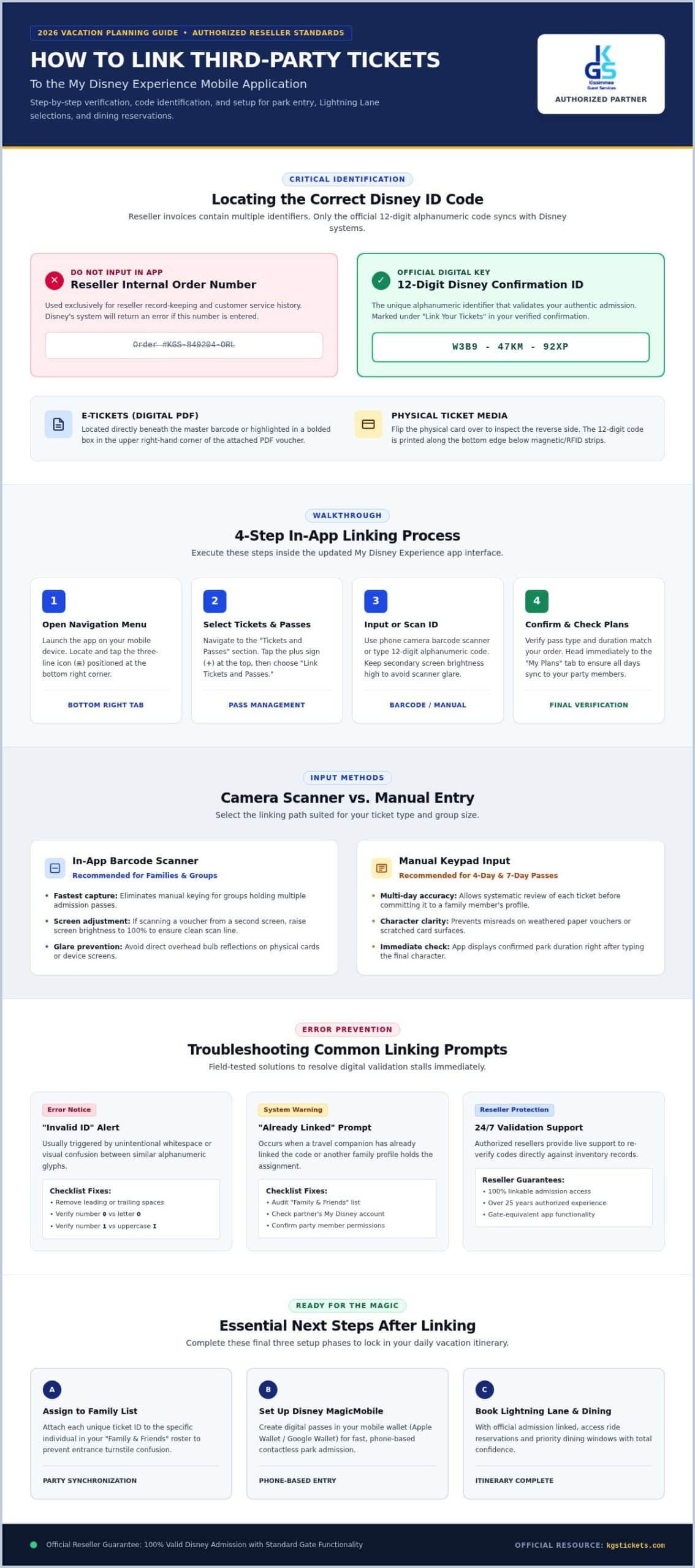
The moment you receive your confirmation email, you’ll likely see a few different strings of numbers. It’s easy to get confused. Your KGS Tickets order number is for our internal records; it helps us track your purchase history. However, when you’re looking at how to link third-party tickets to My Disney Experience app, you need the specific 12-digit alphanumeric Disney Ticket ID. This code is the only language the Disney system speaks. The Disney Confirmation Number is the unique digital key that validates your official walt disney world tickets. You will typically find this in a clearly marked “Link Your Tickets” section of your confirmation email, which we send promptly after your purchase is verified.
E-Tickets vs. Physical Ticket Media
Most 2026 travelers opt for digital delivery. If you chose E-Tickets, open the PDF voucher attached to your email. The 12-digit code is usually located directly under the barcode or in a bolded box in the top right corner. For those who prefer physical ticket media delivered by mail, the process is just as simple. Flip the plastic card over and look for the printed string of characters near the bottom edge. Whether digital or physical, this ID is what bridges the gap between your savings and the magic of the parks.
What an Authorized Reseller Confirmation Looks Like
A legitimate KGS Tickets confirmation is clear, professional, and transparent. It includes our official branding, a summary of your specific park days, and the essential linkable IDs. Because we have served as an authorized reseller for over 25 years, a theme park tickets discount from our site is 100% linkable to your account. You get the exact same app functionality and park access as a ticket bought directly at the gate, without the premium price tag. Look for the “Disney ID” label in your email to ensure you have the right credentials for the next step.
Step-by-Step: How to Link Third-Party Tickets to My Disney Experience App
Ready to turn those digital confirmations into real-world magic? The 2026 version of the app is designed for speed. First, open the My Disney Experience app on your mobile device. Locate the “Tickets and Passes” section, which you can find by tapping the three-line menu icon at the bottom right. Once there, tap the plus sign (+) and select “Link Tickets and Passes.” This is where the magic starts. Knowing how to link third-party tickets to My Disney Experience app correctly ensures your vacation stays on track from day one.
Input your 12-digit ID with precision. Alphanumeric codes often cause confusion, especially between the number “0” and the letter “O.” Take a second to double-check each character. After entering the code, the app will display the ticket type and duration. Confirm these details match your purchase before you finalize the link. If you haven’t secured your entry yet, you can browse authentic discounted tickets from a trusted source to get started.
Using the App’s Barcode Scanner
The fastest way to upload your walt disney world tickets is by using the built-in scanner. Simply point your phone’s camera at the barcode on your E-Ticket or physical card. If you’re scanning from a secondary screen in low light, try increasing the brightness on that device or using a small flashlight to illuminate the code without causing glare. This method is incredibly efficient for large families with multiple passes.
Manual Entry for Multi-Day Passes
For those using 4-day or 7-day discount passes, manual entry is often the most reliable method. Type the ID carefully for each member of your party. Once linked, immediately navigate to the “My Plans” section. Here, you should see each day of your pass reflected accurately. This verification step gives you the peace of mind that your entire itinerary is synchronized and ready for the parks.
Troubleshooting Common Linking Errors in 2026
Technical glitches shouldn’t derail your vacation excitement. If you encounter an “Invalid ID” prompt while learning how to link third-party tickets to My Disney Experience app, the culprit is often a simple typo. Double-check for extra spaces at the beginning or end of your entry. Transposed characters, like swapping a “1” for an “I,” are frequent culprits. It’s also possible that a character was misread from a physical card. Authorized resellers like KGS Tickets provide 24/7 support for official walt disney world tickets validation, ensuring your codes are active and ready for use.
The ‘Already Linked’ Mystery
The “Ticket Already Linked” error is a common point of confusion for groups. This usually happens if a family member added the ticket to their profile without realizing it. Verify your “Family & Friends” list first to see if the pass is already assigned to someone else in your party. If it appears under the wrong name, you can reassign it within the app settings. This quick fix ensures the right person has the right pass before you reach the park entrance.
App Refresh and Cache Issues
Sometimes the 2026 app version experiences minor sync delays due to server traffic. If your tickets don’t appear immediately after a successful link, don’t panic. Use the “Pull to Refresh” gesture on the Tickets and Passes screen to force a data update. If the screen remains blank, force-close the app and restart your mobile device. This often resolves display lag and confirms your tickets are safely stored in your digital wallet. If you haven’t secured your entry yet, buy your Disney tickets here to guarantee a stress-free linking process with expert local support.
Next Steps: What to Do After Your Tickets are Linked
Linking is just the beginning. To make your tickets functional, you must assign each one to a specific person in your “Family & Friends” list. This step is critical because it tells the Disney system exactly who owns which pass. Once assigned, you should immediately set up your “MagicMobile” pass. This feature allows you to use your smartphone as a digital key for park entry, eliminating the need to carry physical cards. Having everything ready in your digital wallet ensures you are prepared for those high-stakes 7:00 AM Lightning Lane bookings. In 2026, many ticket types still require verified park reservations, so check your “My Plans” tab one last time to confirm your dates are locked in.
Setting Up MagicBands and MagicBand+
If you prefer the convenience of wearable tech, pairing your physical bands is the next logical step. Navigate to the “MagicBands and Cards” section of the app to link your band’s serial number to your profile. If you are traveling with a large party using a group discount package, ensure every member is synced under a single lead guest profile. This centralized setup makes it much easier to manage entries and photo downloads for the entire group.
Preparing for Disney Genie+ and Virtual Queues
Early linking is your best defense against missing out on 2026’s newest attractions. You cannot join a virtual queue or purchase a Lightning Lane entry without a valid, linked ticket. Your tickets act as the foundation for the “My Disney Day” planning tool, which provides real-time updates and recommendations based on your linked itinerary. Knowing how to link third-party tickets to My Disney Experience app well in advance of your trip means you can focus on the fun rather than technical hurdles on your first morning at the park.
Start Your 2026 Disney Adventure with Confidence
Now that you’ve mastered the process of how to link third-party tickets to My Disney Experience app, your 2026 vacation is officially on the calendar. You’ve learned how to spot the correct 12-digit Disney ID, avoid common alphanumeric typos, and sync your entire party for early morning Lightning Lane success. These simple steps transform a great deal into a seamless, stress-free experience at the park gates. By handling these technical details now, you’re ensuring that your first day in the magic is spent enjoying attractions rather than troubleshooting app settings.
Choosing an authorized source is the best way to protect your vacation investment and your peace of mind. KGS Tickets has served as a trusted authorized Disney ticket reseller since 1997, providing families with local expertise and a 100% linkable guarantee on every purchase. You don’t have to sacrifice security for a better price. Secure your authorized 2026 Walt Disney World tickets from KGS Tickets today! We’re excited to help you step into the parks and start making memories that will last a lifetime.
Frequently Asked Questions
Can I link tickets bought from an authorized reseller to the app immediately?
Yes, you can link your tickets as soon as you receive your confirmation email containing the 12-digit Disney Ticket ID. Since KGS Tickets is an authorized reseller, our tickets are 100% linkable and ready for immediate digital integration. This allows you to start planning your 2026 itinerary right away. Simply enter the code into the app to connect your purchase to your profile and begin making park arrangements.
What should I do if the My Disney Experience app says my ticket ID is invalid?
First, double-check your entry for common errors like extra spaces or confusing the number “0” with the letter “O.” If the error persists, try force-closing the My Disney Experience app or logging out and back in to refresh the system. If you still have trouble, our support team is available to verify your credentials. Learning how to link third-party tickets to My Disney Experience app is usually straightforward once typos are eliminated.
Do I need to link every person’s ticket to their own separate Disney account?
No, you don’t need a separate account for every traveler. One lead guest can manage the entire group by adding names to their “Family & Friends” list within the app. Once you have added your party members, you can assign each linked ticket to the appropriate person. This centralized approach makes it much easier to coordinate Lightning Lane entries and virtual queue joins for the whole family during your 2026 trip.
Will my third-party tickets work with MagicBand+ once they are linked?
Yes, your third-party tickets will work perfectly with MagicBand+ once they are successfully linked to your account. Because KGS Tickets provides official Walt Disney World tickets, they offer the exact same digital functionality as those purchased directly from the gate. After linking, simply pair your MagicBand+ in the app. This allows you to tap into the parks, access lightning lanes, and link photos to your account with a simple wrist tap.
Is there a deadline for linking my tickets to the My Disney Experience app?
While there isn’t a strict technical deadline, you should link your tickets as soon as possible after purchase. You cannot book Lightning Lane entries or join virtual queues for popular 2026 attractions without a linked ticket. Linking early also ensures that any potential technical issues are resolved long before you arrive at the park entrance. We recommend completing this step at least several weeks before your scheduled departure for total peace of mind.